
Is Using Azure DevOps for Project Management Worth?
If you are looking to learn agile project management, Azure DevOps seems to be the best choice. It allows choosing from a wide option of Azure Board’s planning tools that are perfect for agile project management. So, if you want to shift from traditional project management to an agile approach, DevOps with azure is the best option.
The planning and portfolio management of the Azure Board enables the user to plan swiftly and track all work across the entire team. Major features that altogether help the project team track their workflow throughout the development cycle without any hassles are:
- Task boards
- Product and sprint backlogs
- Dashboards
- Analytics reports, etc.
Users if paired with a project and portfolio management platform i.e. PPM Express can easily connect to Azure DevOps within a single system. This will provide clear visibility of project-related information across groups, systems, and portfolios.
Feature of Azure DevOps Project Management
Azure DevOps comes embedded with integrated features which are accessible either via IDE or web browser. The prominent features available with Azure DevOps include:
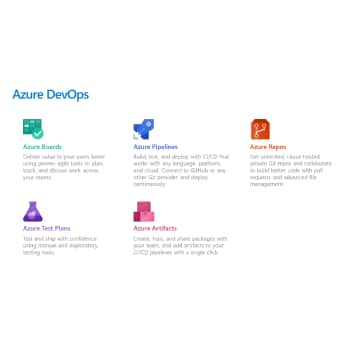
- User Control:
Azure allows you to connect with your Azure Active Directory. Plus, it establishes a synchronization with on-premises AD and can even help invite guests. However, certain access rules are applicable to users, restricting them from watching certain elements. But, when users are allocated to teams, they become capable of accessing code, evaluating work, and colluding with others.
- Azure Guests:
This feature provides you the flexibility to invite guests from other institutions to join the team simply by entering their mail id.
- Groups/Permissions:
Under group management, this attribute allows adding members to the pertinent group on the organization setting page. Further, permissions on a group are also configurable for a project.
- Teams:
This lets users be delegated to one or more teams. This, as a consequence, restricts users to see only what is permitted by a particular team.
- Processes and Types:
Azure DevOps comes with pre-made customized templates. The four common work item templates offered by Azure DevOps include Basic, scrum, agile, and CMMI.
- Backlogs:
Backlog is nothing but a place where you can monitor, plan, and organize your projects. Generally, there are three basic backlogs in Azure DevOps which include the Portfolio backlog, Requirement backlog, and Iteration backlog.
- Boards:
Boards offer an intuitive interface to manage and organize your work. All your work items are placed in card format and arranged according to their latest status for easy understanding.
- Iteration Path:
It is used to assign work items to time intervals and is also known as sprints.
- Areas:
These find utility in breaking down work in a logical sequence, coordinating it with functional areas, and building websites for varied business segments.
- Notifications:
Send alerts to keep your team notified of every important task. Whether it’s a work assignment or activity failure/ success, you can always send alerts as and when needed.
- Dashboards:
Construct your own dashboard for varying purposes based on your team members’ demand, work item criteria, and other attributes as deemed appropriate.
- Azure Repos:
Azure Repos refers to a set of version control tools that allow developers to monitor changes in coding over time.
- Analytics:
Leverage Azure DevOps’s built-in analytics features, such as cumulative flow diagrams, control charts, and burn charts to get real-time updates on your workflow patterns.
How to Use Azure DevOps for Project management?
Users can set up one or more projects, create teams, and add users to teams. These users can be put together into groups that can permit them to perform certain things such as approve builds, update code, alter the deployment process, or generate and run tests.
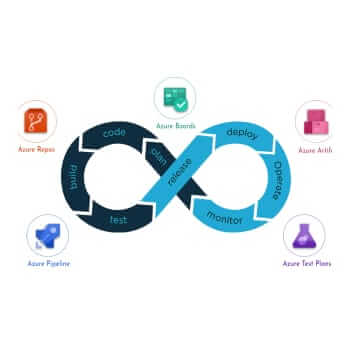
A project employs a process template to indicate the organization of work items. They can be placed into areas on one dimension and iterations on another. Areas are used for dividing the work logically, while iterations are for planning purposes. Once the work item gets completed, a developer will commit their code. This result triggers a build that indicates that the latest code will compile or will get prepared for deployment.
Deployment can be done either manually or automatically to one or more environments. The pipeline then runs tests automatically or manually moving to the next stage. As pipelines are completely configurable, you have the freedom to either include manual steps or automated steps depending on your organization’s specific requirements.
Why Azure DevOps?
Requirements management using Azure DevOps can easily be performed because of its following benefits:
- Hassle-free task distribution and individual team member workload planning interface that allows switching to other projects.
- Task parameters and task creation can be done with just one click in the dashboard mode.
- While reporting the duration, pending tasks are automatically recalculated and the solved ones get reset to zero.
- Area field allows planning at the level of features, epic, and analog of category.
- Supports extensive integration with industry and community tools.
Thus, to achieve this, Microsoft Azure consulting services are envisioned to help companies ensure fast cloud-native development, Azure migration, and high Azure environment optimization. It helps businesses to adopt and use efficient Azure cloud services.
Best Practices to Keep in Mind for Agile Management
- Team Configuration:
Based on the deliverables create agile teams. Dedicate a team for each developers group and then, assign scrum masters to handle the consolidation of agile projects.
- Configure teams along the value streams that your company wants to deliver.
- Configure development teams to support project management teams.
- Sprints Configuration:
This includes configuring a sprint cadence team to be used in a specific product group, specifying iterations for future planning, and figuring out the teams will utilize iterations to manage backlog items.
- Work in Sprints:
This enables developer teams to focus on a definitive series of tasks. The work designated for a sprint is visible in the sprint backlog of your team. However, sprint backlogs exist only for product backlogs and not for portfolio backlogs.
- Sprint Burn-down Chart:
It makes the process of tracking progress completely hassle-free.You can review the deliverables, check with other teams for dependencies, and monitor sprint progress using the sprint burn-down chart.
Conclusion
Hence, with so many features and benefits to offer Azure DevOps is certainly a great tool to be utilized in the Software Development Process. Using it will not only expedite your project delivery but will also ensure to keep up its quality. Hence, this tool provides the best solution to manage the work tasks within a team in an efficient manner.