Category: devops

  • DevOps vs DevSecOps: Key Differences Explained

    DevOps vs DevSecOps: Key Differences Explained

    Therefore, many businesses today are embracing these approaches to develop and maintain software efficiently and safely. However, how can you decide which is better for you—DevOps vs DevSecOps?If you are also facing the same dilemma, this blog is for you. Keep reading for a comprehensive understanding of the key differences between DevOps vs DevSecOps.

    What are the Differences Between DevOps and DevSecOps?
    what is the difference between devops and devsecops
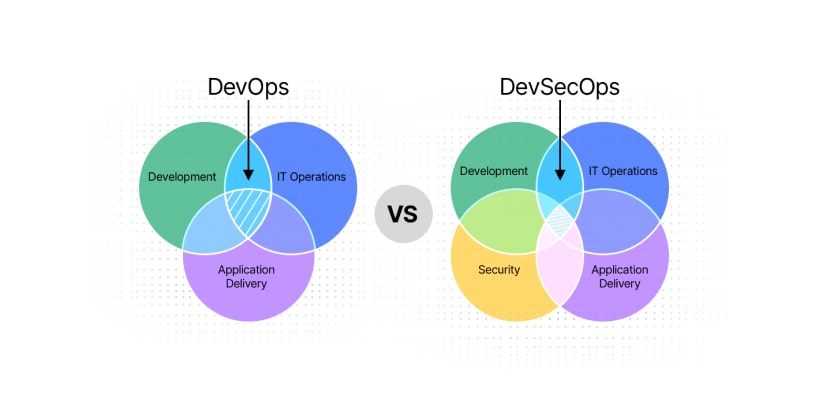
    The primary point of difference between DevOps and DevSecOps lies in their focus. DevOps emphasizes collaboration and automation in software development and IT operations, while DevSecOps integrates security as a central aspect of the development lifecycle.
    The table below highlights 12 key differences that will help you choose which is better between DevOps vs DevSecOps.

    DevOps DevSecOps
    The Prime focus is on development and Operation. Focuses on development security and Operations.
    Looks into providing speed and efficiency. Ensures security and speed.
    Mostly for Developers and IT Operations teams. Teams of developers, security, and IT operations opt for DevSecOps.
    Security features are added later in the pipeline. Security features are included from the start.
    Leverages Continuous Integration and Delivery processes. DevSecOps leverages Continuous Integration, Delivery, and Security processes.
    Tools such as CI/CD and Monitoring play a pivotal role. CI/CD and Security tools are important here.
    Leverages Agile framework. Leverages Agile DevSecOps framework.
    Emphasizes a culture of collaboration. Emphasizes a security-oriented and collaborative culture.
    Minimal risk management measures. Proactive and Continuous risk management measures.
    Focus on reactive compliance. Focus on proactive compliance.
    The automation scope of DevOps focuses mostly on development and deployment. Its automation scope involves development, deployment, and security.
    Vulnerability detection takes place after deployment. Detects vulnerability early in the development cycle.

    What is DevOps?

    To assist you in closely understanding what are the differences between DevOps and DevSecOps, let’s break them down for you.
    DevOps is an amalgamation of “Development” and “Operations”. In this context, DevOps is a culture and practice that fosters collaboration between development and operations teams to streamline software delivery.
    Emphasizing automation, continuous feedback, and shared accountability, DevOps accelerates development cycles and enhances product quality. DevOps integrates tools and processes to simplify testing, deployment, and monitoring tasks. While it excels in speed and efficiency, its focus on security is limited compared to the DevSecOps framework, which embeds security into every stage of development.
    In the DevOps vs DevSecOps discussion, DevOps lays the foundation for agile practices, often implemented with the guidance of experienced DevOps service providers. With DevOps, teams, tools, and processes come together with automation. This ensures you develop and deploy software products faster and deliver value to customers.

    How Does DevOps Work?
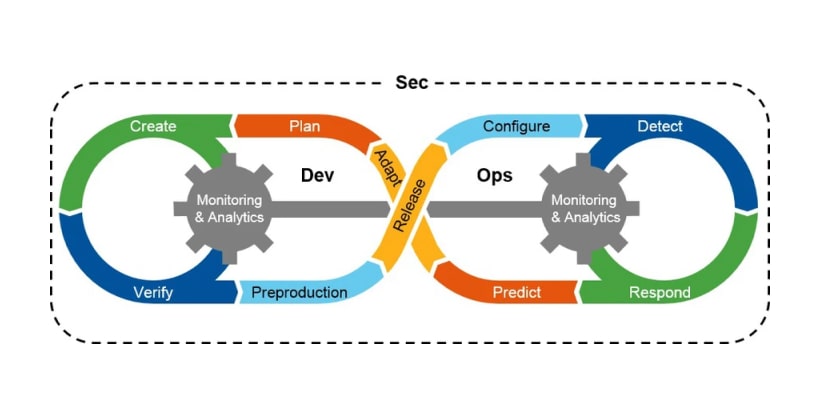
    How Does DevSecOps Work
    To know which is better between DevOps and DevSecOps, take a look at how the former works.
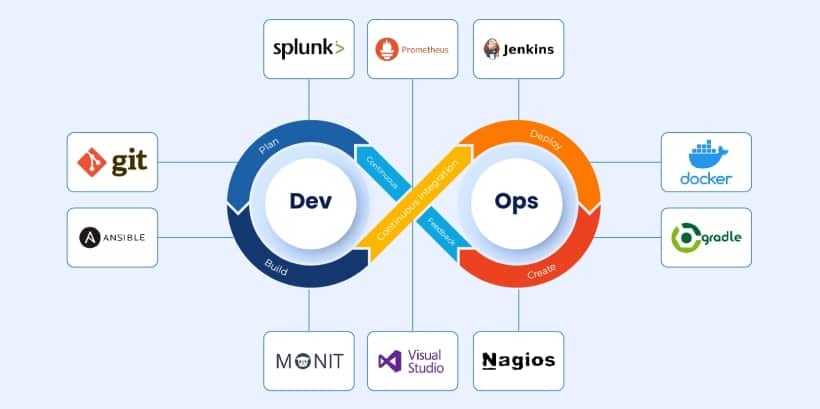
    DevOps fosters seamless collaboration between development and IT operations teams, bridging silos to enhance productivity and efficiency. Leveraging tools and automation, DevOps streamlines workflows across the software lifecycle. This can range from coding and testing to deployment and monitoring.
    Furthermore, Continuous Integration (CI) and Continuous Delivery (CD) form the core of DevOps, enabling frequent, reliable software releases. These practices ensure quicker feedback loops and a higher quality of output.
    Contributing to the DevOps vs DevSecOps debate, the former excels in speed but often lacks a security-first approach. Thus, many businesses turn to DevOps consulting services to implement these practices and optimize their processes.

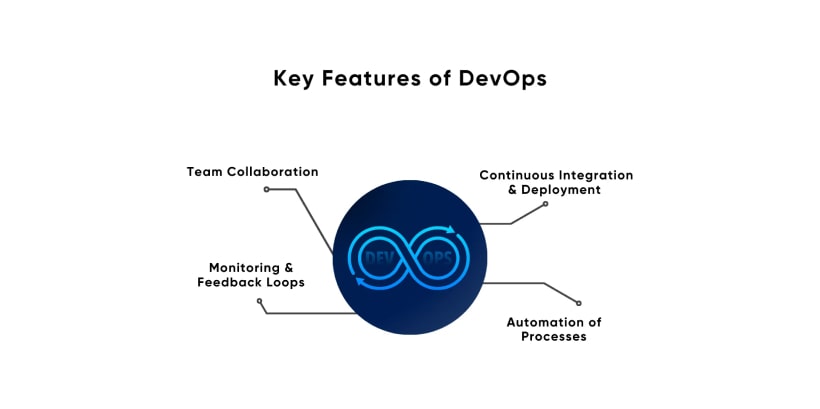
    Key Features of DevOps
    devsecops framework
    You must note the key features to delve deeper into which is better between DevOps vs DevSecOps. These features form the backbone of the methodologies, making them a preferred choice for organizations focusing on speed and collaboration.
    The points below will help you understand the important features of DevOps.

    1. Automation: Streamlining Repetitive Tasks

    Automation is a cornerstone of DevOps. It removes manual intervention in processes like code integration, testing, and deployment. This reduces errors, accelerates workflows, and ensures consistency in software development. Automated testing also enables faster feedback cycles, allowing developers to address issues promptly.

    2. Continuous Delivery: Frequent and Reliable Releases

    With DevOps, continuous delivery becomes a reality. The methodology ensures code is always in a deployable state, facilitating frequent updates and minimizing the risk of deployment failures. This feature is essential for businesses aiming to remain agile in competitive markets.

    3. Collaboration: Enhancing Communication Between Teams

    DevOps fosters a culture of collaboration, breaking down silos between development and IT operations teams. This unified approach ensures better coordination, quick problem resolution, and seamless alignment of goals. Collaboration is especially critical when outsourcing to a DevOps-managed service, as it helps maintain transparent communication and workflow.

    4. Infrastructure as Code (IaC): Simplifying Resource Management

    DevOps uses IaC to manage and provision infrastructure through code, rather than manual processes. This approach ensures consistency, reduces errors, and speeds up infrastructure deployment, making it easier to scale resources as needed.

    5. Scalability: Adapting to Business Needs

    Scalability in DevOps means processes, infrastructure, and tools can adapt to changing business requirements. Whether dealing with increased workloads, expanding teams, or new projects, the scalability offered by DevOps ensures businesses can grow without disrupting operations

    Tools Used in DevOps
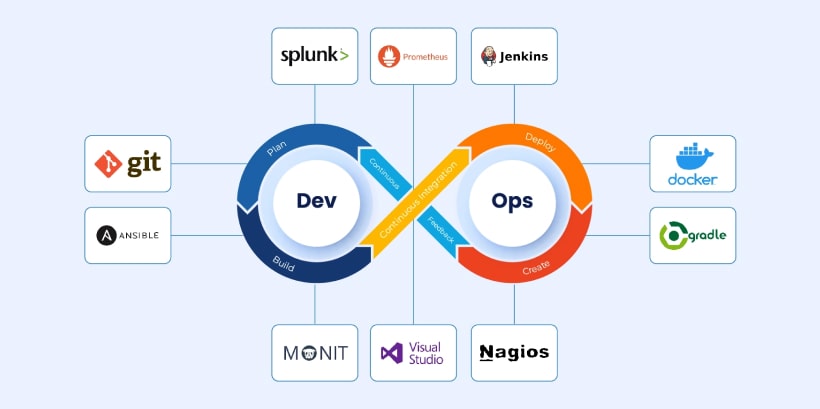
    Tools Used in DevOps
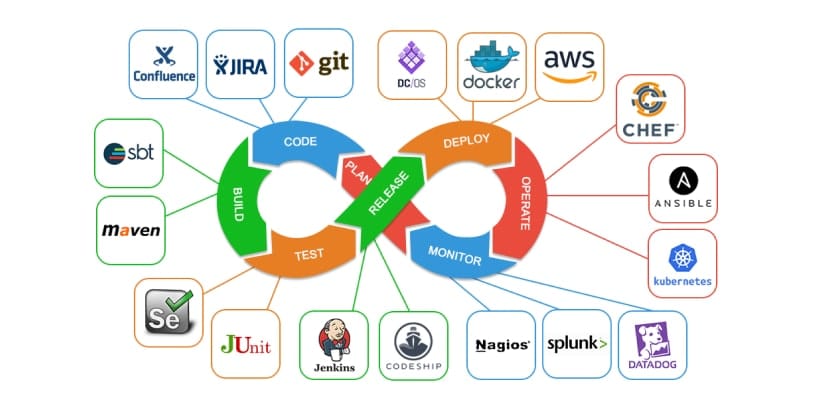
    When exploring DevOps vs DevSecOps, it is crucial to understand the tools that make the former effective. These tools automate processes, enhance collaboration, and ensure efficient workflows.
    Below are three essential tools commonly used in managed DevOps services to streamline development and deployment.

    1. Jenkins

    Jenkins is a widely used automation server that supports continuous integration and continuous delivery (CI/CD). It allows developers to automate build, test, and deployment processes, ensuring faster feedback loops. Jenkins supports numerous plugins, making it adaptable to various workflows and environments. Its flexibility and scalability make it a key tool in DevOps DevSecOps practices.

    2. Kubernetes

    Kubernetes is an orchestration platform designed to manage containerized applications at scale. It automates tasks like deployment, scaling, and management. This ensures applications run efficiently across different environments. With features like self-healing and load balancing, Kubernetes is a vital tool for businesses seeking agility and resilience in their DevOps processes.

    3. Docker

    Docker is a containerization platform that simplifies application deployment by packaging applications and their dependencies into containers. These lightweight, portable units ensure consistency across development, testing, and production environments. By eliminating “it works on my machine” issues, Docker enhances reliability and efficiency. It, thus, supports scalability in managed DevOps services.

    DevOps Best Practices

    DevOps Best Practices
    To implement DevOps effectively, adherence to proven best practices is necessary. Knowing them also helps to resolve the debate and choose which is better—DevOps vs. DevSecOps.
    Furthermore, these best practices assist in streamlining workflow, enhance collaboration, and ensure reliable outcomes. Below are some key strategies experts and DevOps consulting services commonly recommend to maximize the potential of DevOps.

    1. Adopt CI/CD Pipelines for Efficient Delivery

    Continuous Integration (CI) and Continuous Delivery (CD) pipelines automate the process of merging code, testing, and deploying updates. This practice reduces manual intervention, ensures consistent code quality, and accelerates release cycles. It empowers teams to deliver updates frequently and reliably, addressing customer needs and market demands swiftly.

    2. Automate Repetitive Processes for Consistency and Speed

    Automation eliminates the risk of human error in repetitive tasks like testing, deployment, and configuration. By standardizing these processes, teams can ensure consistency across environments, save time, and focus on strategic priorities. Automation is a cornerstone of DevOps, setting it apart in the DevOps vs. DevSecOps discussion.

    3. Monitor and Log Actively to Identify Issues Early

    Active monitoring and logging provide real-time insights into system performance. By tracking key metrics and detecting anomalies, teams can quickly identify and address potential issues before they escalate. This proactive approach enhances system reliability and user experience. By doing so, it reinforces the core principles of collaboration and efficiency in DevOps managed services.

    4. Foster a Culture of Collaboration Across Teams

    DevOps thrives on breaking down silos between development, operations, and other stakeholders. Encouraging open communication and shared accountability ensures that teams work cohesively toward common goals. This culture of collaboration fosters innovation and drives efficiency, making it a critical aspect of successful DevOps adoption.

    Benefits of DevOps

    Benefits of DevOps
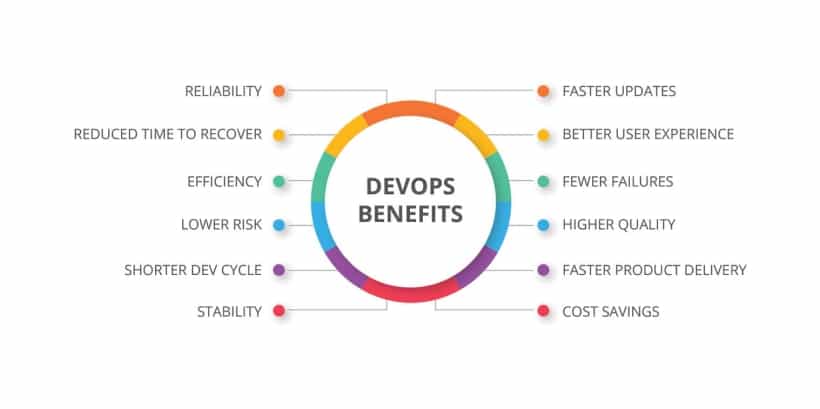
    When comparing DevOps vs DevSecOps, it becomes evident that DevOps offers numerous advantages for businesses focusing on speed, efficiency, and collaboration. Below are some key benefits that demonstrate why DevOps is a preferred methodology for modern software development.

    • Faster time-to-market.
    • Scalability of processes.
    • Enhanced product quality through continuous feedback.
    • Improved collaboration and productivity.
    • Cost-efficient as it minimizes downtime and manual labor.

    Cons of DevOps

    Cons of DevOps
    Besides the above features, best practices, and benefits, you must also know the potential risks that developers might face while working with DevOps. This shall help you make an informed decision regarding which is better between DevOps vs DevSecOps. On this note, take a look at a few of the potential risks of leveraging DevOps.

    • Limited focus on security.
    • Initial implementation challenges.
    • Requires a cultural shift within teams.

    What is DevSecOps?

    What is DevSecOps
    Now that you have an idea about DevOps, let’s delve into what DevSecOps is to know which is better between DevOps vs DevSecOps.
    DevSecOps, short for Development, Security, and Operations, is an evolution of DevOps that prioritizes security at every stage of the software development lifecycle. Unlike traditional DevOps, which often integrates security later, DevSecOps adopts a security-first approach without sacrificing speed or agility.
    Furthermore, the DevSecOps framework includes tools and practices for proactive threat detection, vulnerability management, and compliance. This ensures applications are secure and reliable from the outset. With DevSecOps defined, you can focus on bridging the gap in DevOps and DevSecOps by addressing modern cybersecurity challenges effectively.
    Many DevOps service providers now offer tailored solutions to help businesses transition to DevSecOps seamlessly.

    How Does DevSecOps Work?

    DevSecOps integrates robust security practices into the CI/CD pipeline. This ensures that security is addressed throughout the development lifecycle.
    Moreover, activities like security testing, vulnerability assessments, and compliance checks occur alongside development and deployment tasks. This proactive approach minimizes risks and ensures high-quality software delivery. Also, collaboration among developers, IT operations, and security teams is critical to stress the effectiveness of DevSecOps practices.
    Unlike traditional DevOps vs. DevSecOps, the latter ensures that security is not an afterthought but a built-in process. Therefore, the adoption of agile DevSecOps practices enhances adaptability. On this note, managed DevOps services often include tailored security solutions to simplify and streamline the transition.

    Key Features of DevSecOps
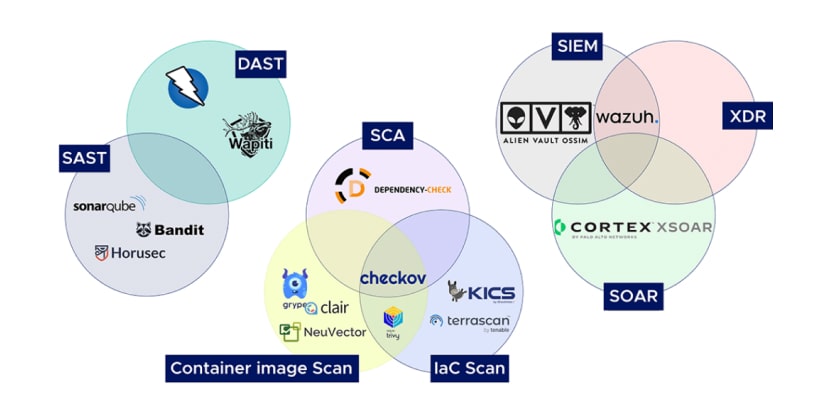
    Key Features of DevSecOps
    When evaluating DevOps vs DevSecOps, it becomes evident that DevSecOps is specifically designed to embed security into the development process. This approach ensures that software is not only efficient but also secure and compliant with regulatory standards.
    Therefore, to delve deeper into DevSecOps, take a look at its key features below.

    1. Continuous Monitoring: Ensure Real-Time Threat Detection

    Real-time monitoring tools continuously track potential threats and anomalies in the application. This ensures swift detection and resolution of security issues. This safeguards applications even after deployment. Continuous monitoring is a vital aspect of the DevOps framework, which is enhanced further in DevSecOps.

    2. Integrated Security Tools: Streamline Threat Management

    DevSecOps incorporates advanced security tools into CI/CD pipelines. This enables efficient threat detection and response. Furthermore, these tools simplify vulnerability management, making the development process faster and more secure.

    3. Collaboration: Unify Security with Development and Operations

    DevSecOps emphasizes collaboration between developers, IT operations, and security teams. This helps foster a unified approach that ensures that security concerns are addressed without hindering development speed. It consequently bridges the gap highlighted in the DevOps vs DevSecOps debate.

    4. Compliance: Automate Regulatory Adherence

    Compliance with industry regulations is a crucial aspect of modern software development. DevSecOps also automates compliance checks, ensuring adherence to standards while saving time and resources. This automated approach reduces the risk of penalties and enhances reliability.
    These above features highlight the value of DevSecOps in creating secure and efficient software. Many DevOps service providers now offer comprehensive DevSecOps solutions to help organizations address modern security challenges effectively.

    Tools Used in DevSecOps

    Tools Used in DevSecOps
    When transitioning from DevOps to DevSecOps, selecting the right tools is crucial. It assists in embedding security into every stage of the development lifecycle. On this note, find below the three best tools used in Agile DevSecOps environments and recommended by many DevOps consulting services.

    1. SonarQube

    SonarQube is a powerful tool for static code analysis, helping developers identify bugs, vulnerabilities, and code smells early in the development process. It supports multiple programming languages and integrates seamlessly into CI/CD pipelines. By ensuring code quality and security, SonarQube plays a critical role in maintaining high standards in Agile DevSecOps environments.

    2. Aqua Security

    Aqua Security specializes in container security, providing robust protection for containerized applications. It helps detect vulnerabilities, enforce compliance policies, and manage risks in container environments. With features like runtime protection and image scanning, Aqua Security ensures secure deployments, making it an indispensable tool in the DevOps DevSecOps transition.

    3. HashiCorp Vault

    HashiCorp Vault is a tool designed to manage API keys and sensitive data securely. It provides encryption, access control, and auditing capabilities, ensuring that sensitive information remains protected. By simplifying secret management, Vault helps teams maintain security best practices without slowing down development workflows, a key priority in DevOps consulting services.

    DevSecOps Best Practices


    When comparing DevOps vs. DevSecOps, adopting DevSecOps best practices is essential for ensuring that security is deeply integrated into the development process. These help organizations streamline secure software delivery while maintaining speed and agility. On this note, find below some critical practices for implementing DevSecOps successfully.

    • Incorporate security testing into CI/CD pipelines.

    Integrating security testing into CI/CD pipelines ensures that vulnerabilities are detected early. This prevents bugs from reaching production. Furthermore, the continuous scanning for potential issues, such as code flaws or misconfigurations, reduces the risk of security breaches. This, in return, strengthens the overall software quality. It also forms an integral part of any DevSecOps framework.

    • Train teams to adopt a security-first mindset.

    To achieve effective security in DevSecOps, all team members—developers, operations, and security professionals—must be trained to prioritize security throughout the development process. By promoting a security-first culture, teams ensure that security considerations are woven into every phase of development, from coding to deployment. This approach ultimately minimizes risks and improves response times to emerging threats.

    • Use DevSecOps frameworks for structured implementations.

    DevSecOps frameworks provide guidelines, tools, and practices for organizations to adopt a structured approach to integrating security. These frameworks offer standardized processes that help teams incorporate security across all stages of the development lifecycle. This ensures consistency and reduces the likelihood of gaps in security protocols. Therefore, following such frameworks enhances the overall security posture and efficiency of the system.

    • Regularly update and refine security tools and practices.

    Security tools and practices should not remain static. As new threats emerge and technologies evolve, regular updates and refinements are crucial for maintaining security effectiveness. By keeping security tools current and evaluating practices periodically, organizations can stay ahead of cyber threats and ensure that their applications are always secure.

    Benefits of DevSecOps
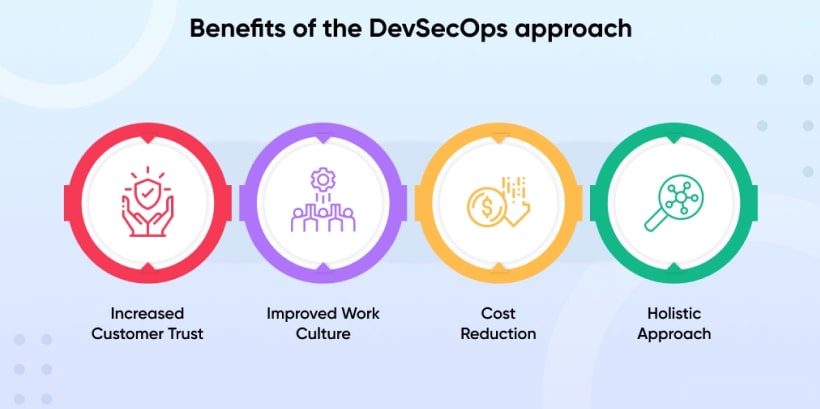
    Benefits of DevSecOps
    The advantages of DevSecOps become evident when comparing DevOps vs DevSecOps. Between the two, the latter focuses on embedding security throughout the software development lifecycle.
    For detailed knowledge of DevSecOps, here are some key benefits that prove DevSecOps is a game-changer:

    • Early detection and resolution of vulnerabilities.
    • Increased trust in software security.
    • Compliance with regulatory requirements.
    • Enhanced collaboration between teams.

    On this note, partnering with a trusted DevOps service provider can simplify the transition to DevSecOps. They offer expertise in integrating security tools, setting up efficient pipelines, and guiding businesses in adopting modern security-focused methodologies.

    Cons of DevSecOps
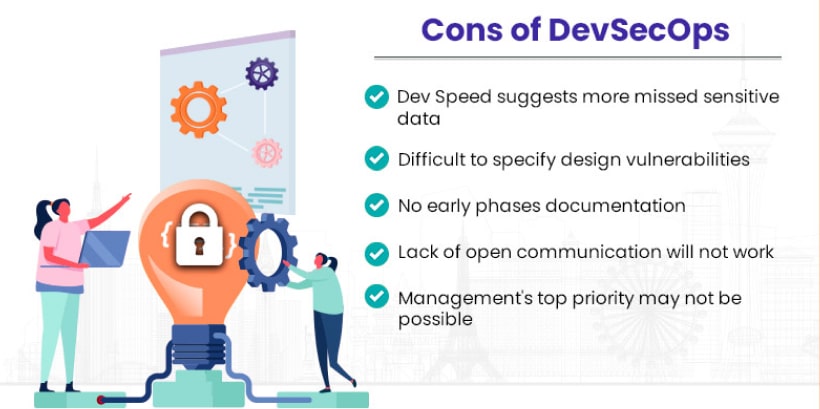
    Cons of DevSecOps
    Besides the above perks, here are a few cons you must be mindful of while studying DevOps vs DevSecOps.

    • Higher initial implementation costs.
    • The steeper learning curve for teams.
    • Requires continuous investment in security tools.

    Final words

    The debate on DevOps vs DevSecOps highlights the growing importance of integrating security into software development processes. While DevOps accelerates development and delivery, DevSecOps ensures that security is not an afterthought. Therefore, businesses must evaluate their goals, challenges, and resources to determine the right approach.
    Looking to implement DevOps consulting services or transition from DevOps to DevSecOps? Connect with the experts at MoreYeahs for tailored solutions that meet your business needs.

    Frequently Asked Questions

    Which is better, DevSecOps or cybersecurity?

    DevSecOps and cybersecurity serve different purposes; DevSecOps integrates security into development, while cybersecurity focuses on broader organizational protection. You must use the former while building a product where cybersecurity is necessary; there is digitization involved.

    Does DevSecOps include DevOps?

    Yes, the DevSecOps framework includes DevOps by extending its practices with integrated security measures throughout the software development and delivery lifecycle.

    How to move from DevOps to DevSecOps?<

    To move from DevOps to DevSecOps, consider integrating security tools, fostering collaboration, automating testing, and adopting a security-first mindset.

    Which Azure tool is used in DevSecOps?

    Azure DevOps and Microsoft Defender for Cloud are commonly used in DevSecOps to support CI/CD pipelines and enhance security.

    Is DevSecOps Agile?

    Yes, DevSecOps aligns with Agile principles by emphasizing collaboration, continuous delivery, and iterative improvement while integrating security into development workflows.

  • The Evolution of DevOps in Cloud Computing: Trends Shaping the Future

    The Evolution of DevOps in Cloud Computing: Trends Shaping the Future

    Cloud computing is the process through which we can access on-demand computer resources. This includes servers, storage, and software over the Internet, for efficient development, scalability, and flexibility. Cloud computing is the process through which we can access on-demand computer resources. This includes servers, storage, and software over the Internet, for efficient development, scalability, and flexibility. Keep reading to learn about the shifting trends of DevOps in cloud computing and how this trend shapes the future.

    Defining DevOps in Cloud Computing

    Defining DevOps in Cloud Computing
    In simple terms, DevOps in Cloud Computing is a practice that assists the development and operations team to automate and streamline software delivery processes. You can integrate DevOps software into your system by yourself, however, if you find this procedure complicated, consider connecting the best AWS, and Azure integrates into your system to enable continuous integration and continuous delivery processes. Furthermore, DevOps tools like Infrastructure as Code, containers, and orchestration platforms like Kubernetes also play an important role. These are pivotal for teams to rapidly develop, deploy, and scale applications. Unlike, traditional processes, these DevOps automation tools reduce manual labor, save time, and test applications at every stage of deployment to achieve perfection. Thus, with evolving DevOps automation practices, the development and automation team deploys and scales applications in dynamic environment teams. This is a great measure to help improve collaboration, efficiency, and reliability while delivering top-notch results.

    How DevOps in Cloud Computing Works?

    How DevOps in Cloud Computing Works
    Now that you have an idea about what is DevOps in cloud computing, let’s take you through how it works. The points below will paint a simplified picture for you about the working of DevOps in cloud computing.

    • Automation
      DevOps in the cloud is a great way to automate monotonous tasks such as code testing, integration, and deployment with tools like Jenkins and GitLab.
    • Collaboration
      DevOps in cloud computing is also a powerful way to bridge gaps between development and operation teams. They can work together on the same application and can check, alter, or refer to past activities and every change and version to app development process will get stored in the cloud.

    Collaboration

    • Feedback and Monitoring
      Cloud services working with DevOps monitor the application development process closely and provide real-time feedback for smooth functioning.
    • Infrastructure as a Code
      DevOps in cloud computing platforms like Terraform manages Infrastructure as Code and ensures automation of cloud resource management.

    Infrastructure as a Code

    • Continuous Integration
      Through Continuous Integration, application developers consistently merge codes into a shared memory or repository to ensure automated testing.
    • Continuous Delivery
      After testing, Continuous Delivery processes automatically deploy the successfully tested codes to production environments.

    Continuous Delivery

    Evolution of DevOps in Cloud Computing

    The evolution of DevOps in Cloud Computing began with traditional IT operations marking a transformative journey. The points below will take you to the evolution stages of software development and processes with time.
    Evolution of DevOps in Cloud Computing

    Traditional IT Operation or Pre-Cloud Era

    Before delving into the world of DevOps in cloud computing, traditional IT operations dominated the landscape. Siloed teams, manual operations, and inefficient and slow development cycles were some of the major problems of this period. The urge to overcome these shortcomings led the world to transition and embrace cloud computing practices.

    Early Computer Clouding

    Early Computer Clouding
    To mark the transition from traditional IT operations to cloud computing and DevOps, several cloud platforms started to gain popularity. Some of these popular platforms that led to the onset of the early cloud computing period are Azure, AWS, and GCP.This period also introduced Infrastructure as a Service and brought to the limelight virtualized infrastructure and on-demand scalability. These new platforms also opened up the scope for faster provisioning and management through automation as DevOps automation practices.

    DevOps Principle

    The importance of DevOps automation tools heightened in the mid-2000s period. During this time, DevOps in the Cloud was growing popular with CI/CD pipelines and automation. These play a pivotal role in continuously integrating, testing, and deployment. At such times, DevOps tools like Jenkins, Terraform, and Ansible emerge to automate infrastructure and deployment.

    Cloud Native DevOps

    Cloud Native DevOp
    This is another crucial period that you must make note of while considering the evolution of DevOps in Cloud Computing. The onset of the 2010 era witnessed the rise of micro services and container orchestration platforms like Docker, Kubernetes, and similar cloud-native development platforms. These platforms are a great solution to help you independently deploy and scale services with better accuracy.

    Infrastructure as Code or IaC

    As the evolution of DevOps in Cloud Computing moved forward, IaC started to rise towards the zenith of popularity. Users also embraced tools like Cloud Formation and Terraform to improve instances of automation of monotonous work and reduce manual labor with Infrastructure as Code.

    Serverless Computing

    Serverless Computing
    Another important achievement of DevOps in Cloud is serverless computing which took over the digital landscape during the later part of the previous decade. Serverless computing systems example AWS Lambda let developers focus on writing code without managing the infrastructure. To ensure this, the cloud platform handles scaling and resource management.

    AI and Automation

    As we moved into the 2020s, DevOps in Cloud Computing witnessed a new integration with AI/ML. This new digital landscape known as AIOps introduced us to proactive monitoring, predictive analytics, and automation of processes which also reduced automation overhead. Besides this, NoOps also started to dominate the market to enable complete automation of domestic tasks.

    Edge Computing and Hybrid Environments

    Edge Computing and Hybrid Environments
    Edge Computing practices expands the scope of DevOps in Computing to distributed environments. Furthermore, hybrid and multi-cloud methods are also crucial for the DevOps team to manage workflow across diverse platforms.

    DevSecOps and Cloud Security

    As DevOps in cloud computing evolves and the digital world calls dibs for the driving seat of technology advancement and the future, the security of sensitive data gains importance. The rise of DevSecOps marks the integration of security practices at every stage of application development and deployment. Today, implementing DevSecOps tools in the CI/CD pipeline is crucial for automated security testing, policy enforcement, and vulnerability scanning. Furthermore, Cloud providers also offer integrated security tools. This includes Azure Security Centre, Google Cloud Security Command Centre, and AWS Shield. They are pivotal tools to enforce top-notch security practices within DevOps workflow.

    GitOps and Future Trends

    GitOps and Future Trends
    The advancement of IaC and DevOps in Cloud Computing brings to the table a relatively new trend of GitOps. As a future of DevOps, GitOps utilizes Git as the sole source of information for both application and infrastructure development. Utilizing this platform, organizations can focus on managing their entire system through automation of deployments and version control. This is essential whenever there is a change in repository.

    Bottom Line

    To conclude, DevOps in cloud computing and its rapidly evolving trends have introduced automation, security, reliability, and scalability to the mainstream process of software development. It is an essential solution in today’s fast-paced digital world to enhance collaboration, ensure accuracy, and drive deployments faster. To know how DevOps in clouds is the best solution for your business to achieve its goals faster connect with our DevOps experts.

    Frequently Asked Questions

    1. How does Cloud Computing support DevOps?
    DevOps in cloud computing integrates with development and operational teams to automate functions like testing, code deployment, and infrastructural management with the help of cloud services like AWS.
    2. What are the key benefits of DevOps in cloud computing?
    Faster delivery, cost efficiency for using on-demand resources, automated deployment processes, better monitoring, and feedback loop are some key benefits for DevOps in cloud computing.
    3. What are common DevOps in cloud computing service providers?
    Microsoft Azure, Amazon Web Services (AWS) and Google Cloud platforms are common providers of DevOps in cloud computing.

  • 11 Best DevOps Automation Tools to Consider in 2024

    11 Best DevOps Automation Tools to Consider in 2024

    Best DevOps Automation Tools for 2024

    There are three initial phases in DevOps lifecycle; planning, building, and coding. Let’s take you through the best DevOps automation tools for 2024 for different functions.

    Jira

    Jira
    Jira is an efficient project management, planning and issue tracking platform. With Jira, you can access and exercise features like bug tracking, workflow customization and task management. This helps Jira to adapt itself easily to various project needs and changes. Furthermore, Jira also has strong reporting and visualization tools.

    This shall help teams to improve productivity and collaborate effectively to ensure transparency in the development lifecycle.

    Git

    Git
    This version control system is a free and open-source platform to manage the source code of an application or software. Git is an excellent DevOps tool because it helps build a bridge between development and operations with GitHub. As a DevOps automation tool, it enables further collaboration and supports nonlinear workflows among programmers. As a DevOps automation platform, Git allows several team members to work on a code without overwriting each other’s work.

    Furthermore, Git also maintains a comprehensive record of all the changes made in the code. This allows convenient tracking of changes, reverting to previous state, and smooth collaboration among teams.

    Jenkins


    As a Java-based open-source program Jenkins helps software development for building, testing and deploying applications. Additionally, Jenkins allows developers to integrate code changes swiftly and look into deployment of updates automatically. It also supports several plugins that allow the platform to integrate with diverse platforms and tools.

    Jenkins is known for extensive workflow customization; and easy installation. With these, Jenkins ensures flexibility while building complex deployment pipelines.

    Kubernetes

    Kubernetes
    Also popular as K8s, Kubernetes play an essential role in today’s software development and operation. As modern organizations rapidly embrace micro service architecture and containerization for their apps, Kubernetes provide infrastructure to deploy, scale and maintain these containers professionally.

    Kubernetes also provides a backbone to cloud-native ecosystems that allows organizations to speed up software deployment, respond well and improve utilization of resources with growing demand of digital landscape.

    Selenium

    Selenium
    It is also an open-source development tool that provides automation support across several browsers and OS. Selenium is used for writing test scripts in popular programming languages such as Java, Python, and C#. Selenium web driver and its core components assists in creation of browser-based regression automation tests. With this feature, the DevOps automation tool enables parallel test execution across different environments.

    It also helps automate repetitive tasks while enhancing accuracy, efficiency and coverage. These make Selenium a crucial tool for continuous integration and delivery.

    Bamboo

    Bamboo
    It is a server-based DevOps automation tool. Bamboo is popular for compact integration with Jira and parallel testing capabilities. Bamboo allows users to create complex build plans and trigger them to start automatically. Furthermore, Bamboo also supports several programming languages. This helps teams identify and address issues quickly with a real time feedback system and detailed reporting. It also introduces customizable workflows and seamless integration with the version control system.

    Bamboo also streamlines development processes while enhancing productivity in the software development process.

    Docker

    Docker
    Docker is an open source platform which ensures application deployment within lightweight and portable containers. This DevOps automation tool collects softwares and its dependencies. By doing so, Docker ensures consistency across diverse environments.

    Furthermore, Docker containers are lightweight, isolated and portable. This helps developers to simplify the development, testing and deployment process.

    Ansible

    Ansible devops automation tool
    Ansible is an open-source automation platform that enables the creation of machine groups. It also looks into control of how they will run in production environments. Ansible also uses human readable YAML syntax that allows users to define automation tasks in a simple language. Additionally, Ansible also automates configuration management, task automation and application deployment.

    It also automates the need for manual intervention. Its agent less architecture also makes it easy for developers to set up and maintain Ansible.

    Prometheus


    Prometheus is an essential DevOps automation tool for monitoring and alerting. Prometheus, furthermore, is important for data collection, store and analyze diverse metrics. This helps provide a cloud environment for team members to access infrastructure and containers.

    Furthermore, Prometheus also uses pull-based models to scrape data and metrics from targets and export them to help integration with different systems.

    Terraform

    Terraform
    It is an open-source IaC software tool that enables the management of various cloud services via a consistent CLI workflow. It plays an important role in modern infrastructure and provisioning and management. Terraform provides scalability and agility as a DevOps automation tool. This assists in keeping up with the growing and ever changing demands of modern application.

    Chef


    DevOps automation tool, Chef is a powerful platform essential to manage IaC. Chef helps in enhancing efficiency and consistency across the entire infrastructure. It enables greater flexibility and control with its configurations while reducing manual errors.

    To enhance benefits of automation in DevOps, Chef also supports a broad range of technologies. This includes difficult-to-automate legacy desktop applications. It also integrates with diverse cloud providers which eventually supports continuous delivery. These make Chef an efficient tool for modern DevOps practices with efficient infrastructure management.

    Sum Up

    DevOps automation tools have revolutionized the software development and IT operations landscape. These tools have brought efficiency among teams and fostered a seamless collaboration. By eliminating manual and repetitive tasks these tools have speed up the processes. However, choosing the right DevOps automation platform can be an overwhelming process.

    To avoid confusion, and choose the right tool, you can connect with DevOps consulting service providers at MoreYeahs. For a detailed guidance on DevOps automation tools and strategies, explore our website.

    Frequently Asked Questions

    What is the future of DevOps automation?
    The future of DevOps automation is quite bright and promising as automation, continuous integration and collaboration is gaining importance. Furthermore, businesses will also strive to deliver high quality, secure and attractive software more rapidly.
    What are some common challenges one faces while integrating DevOps automation?
    While implementing DevOps automation tools to your existing system, you can face challenges like low number skilled employees to manage them and complicated legacy systems. Furthermore, you can face issues like security compliance and management of tool sprawl. With efficient training and communication, you can work on overcoming these issues in organization.
    How can DevOps automation tools benefit your business?
    Some of the benefits of DevOps automation tools for your business are providing more visibility in system outcomes, tracking dependencies, and lower instances of human error. It also promises higher scalability, resolves issues with lesser complexity and provides a stable environment for operation.

  • DevOps Automation: Best Practices and Benefits in 2024

    DevOps Automation: Best Practices and Benefits in 2024

    Understanding DevOps Automation

    Understanding DevOps Automation
    DevOps automation refers to utilization of tools and processes to automate the manual and repetitive tasks. Automation of DevOps is important as it promotes better collaboration and communication.

    The benefits of DevOps automation lie in relieving team members from the manual hassle. With this, team members can automate routine and repetitive tasks. By doing so, team members can shift their focus on other important tasks. Thus ensuring improved collaboration.

    With improved collaboration, one can witness rise in productivity and resulting in faster and accurate code of application deployment.

    Keep reading to know more on DevOps automation benefits and best practices.

    Importance of Automation in the DevOps lifecycle


    The points below will take you through the importance of the role of automation in DevOps.

    Smooth Collaboration

    With automation of DevOps managed services, team members can focus on diverse other works.

    Improved Efficiency

    Improved Efficiency
    A most noteworthy benefit of DevOps automation is eliminating the manual labor of slow repetitive tasks. Automating these repetitive tasks helps free up time to strategize plans for improvement.

    Scalability

    Scalability
    With best automation tools for DevOps, team members can look into progress of operations as project moves forward.

    Quick Delivery

    Quick Delivery
    It is no longer a secret that DevOps automation process can help catalyze tasks by eliminating the manual labor.

    Scope of Continuous Improvement

    DevOps Consulting Services opens room for continuous improvement and deployment. This helps foster an environment of growth and innovation.

    Enhanced Reliability and Consistency

    DevOps automation reduces the need for manual labor while catalyzing processes. This also ensures less chance for human error along with consistency in results.

    What are DevOps Automation Best Practices?

    What are DevOps Automation Best Practices
    You can follow Azure DevOps Automation best practices to implement efficiency and smooth collaboration in your workforce.

    Implementing Continuous Integration and Continuous Deployment

    Continuous Integration or CI acts like a tuning fork which inspects and identifies potential issues with code and discordant notes in the program. Implementing CI will help team members detect errors in code that can cause issues and work on it efficiently.

    Once the errors in the code are rectified and it is in tune, Continuous Deployment automates the delivery process. This system further ensures each system transitions to the production stage. Thus, CI and CD ensure faster and more reliable release of code with automation processes.

    Monitoring and Observatory


    Another best practice of DevOps automation involves monitoring of code. DevOps team implements this to detect and alert about any kind of performance issues or failures. DevOps automation processes use logs, metrics and tracing tools to provide deep insights. This lets programmers identify and address issues before they disrupt the flow.

    Automation

    Conducting repetitive tasks daily can slow down productivity and delay deployment. Addressing this is one of the prime benefits of DevOps automation. With the right DevOps automation tool, your team members do not need to perform repetitive tasks like configuration and deployment manually. By automating such processes, team members get more time to focus on overall performance.

    Testing

    Testing
    Before delivery, comprehensive testing of code is mandatory to ensure flawless results. With automated DevOps services, you can implement automated testing units to detect bugs in code. This also ensures the system works smoothly as a whole to provide efficiency.

    Continuous Feedback and Improvement

    This is another noteworthy DevOps automation consulting service practice. With an automated DevOps process, you can establish a feedback thread to receive and resolve inputs from various stages of DevOps pipelines.

    Benefits of DevOps Automation

    Benefits of DevOps Automation
    The points below will highlight the 10 noteworthy benefits of DevOps automation to introduce efficiency in DevOps lifecycle.

    Improved Quality and Reliability

    DevOps automation ensures that the code in question is examined critically before deployment. Conducting a quality check for the code, helps develop higher quality software which is comparatively more reliable than those which are not frequently tested. Through this frequent testing procedure, errors and bugs get instantly detected and rectified before final deployment.

    Less Human Errors

    Less Human Errors
    Reduction of human generated errors is another noteworthy benefit of DevOps automation. By automating DevOps processes, you can reduce the chances of human error for complicated processes. Thus it ensures accuracy and reliability of configurations and deployments.

    Cost Efficient

    As a benefit of DevOps automation, it reduces a great number of manual and repetitive tasks to streamline deployment process. The automation process helps lower the operational cost and allows teams to focus on other higher priority activities.

    Faster Time to Market

    Faster Time to Market
    Automation of DevOps operation ensures accuracy while streamlining deployment with faster delivery. This also helps in reducing time in introducing big products in market.

    Better Collaboration and Communication

    With the right DevOps practice, you can ensure better collaboration between development, operation and other teams. Automation of DevOps processes helps improve these communication and collaboration processes by addressing the manual labor that goes to conduct repetitive and complex tasks.

    Scalability

    With the benefits of DevOps automation, you can scale infrastructure and applications more closely. Additionally, with automated processes, you can handle increased work pressure and deployment much more efficiently. This can also ensure that the system will work accurately and grow without human intervention.

    Consistency

    Another benefit of DevOps automation is consistency in the environment across development, testing and production. With the right DevOps automation service provider like MoreYeahs, you can ensure accuracy and consistency in building reliable infrastructure setup.

    Enhanced Security


    With automation, you can also introduce security practices in DevOps pipeline using testing and compliance checks. These processes allow teams to detect bugs before hand and address them early in the initial stage of the development process.

    Faster Time for Recovery

    Automation in DevOps also introduces automated rollback and recovery mechanisms to ensure faster responses for failures. This benefits in reduction of software downtime and always maintains service availability.

    Better Metrics and Monitoring Capability

    Better Metrics and Monitoring Capability
    Automation of DevOps services also provides better visibility for the performance and health of applications. Thus, monitoring capability is a noteworthy benefit of DevOps automation.

    To conclude, with the above benefits of DevOps Automation, you can create a highly efficient, reliable, and scalable software development cycle.

    Wish to know more? Explore our website or contact us for the best automation tools for DevOps.

    Frequently Asked Questions

    What are some common DevOps practices?
    Continuous integration, continuous deployment, automated testing, monitoring, logging, micro service architecture and Infrastructure as code are few of the best DevOps practices.
    What is DevOps automation?
    DevOps automation helps automate software development and deployment processes by reducing manual labor in conducting repetitive tasks. The benefits of DevOps automation involves improved collaboration, reduces human error and ensures faster time to market.
    Why should I opt for DevOps automation?
    The major benefit of automation in DevOps is its assistance in streamlining and accelerating the software development process. DevOps automation also ensures consistency, efficiency and reduces human error in complex codes. Thus with these, DevOps automation provides scalability and reliability while catalyzing product deployment process.

  • What is DevOps Automation and How it Transforms Organizations?

    What is DevOps Automation and How it Transforms Organizations?

    Understanding DevOps Automation

    Understanding DevOps Automation
    To understand what DevOps Automation is, let’s look into its definition and scope in a simplified manner.

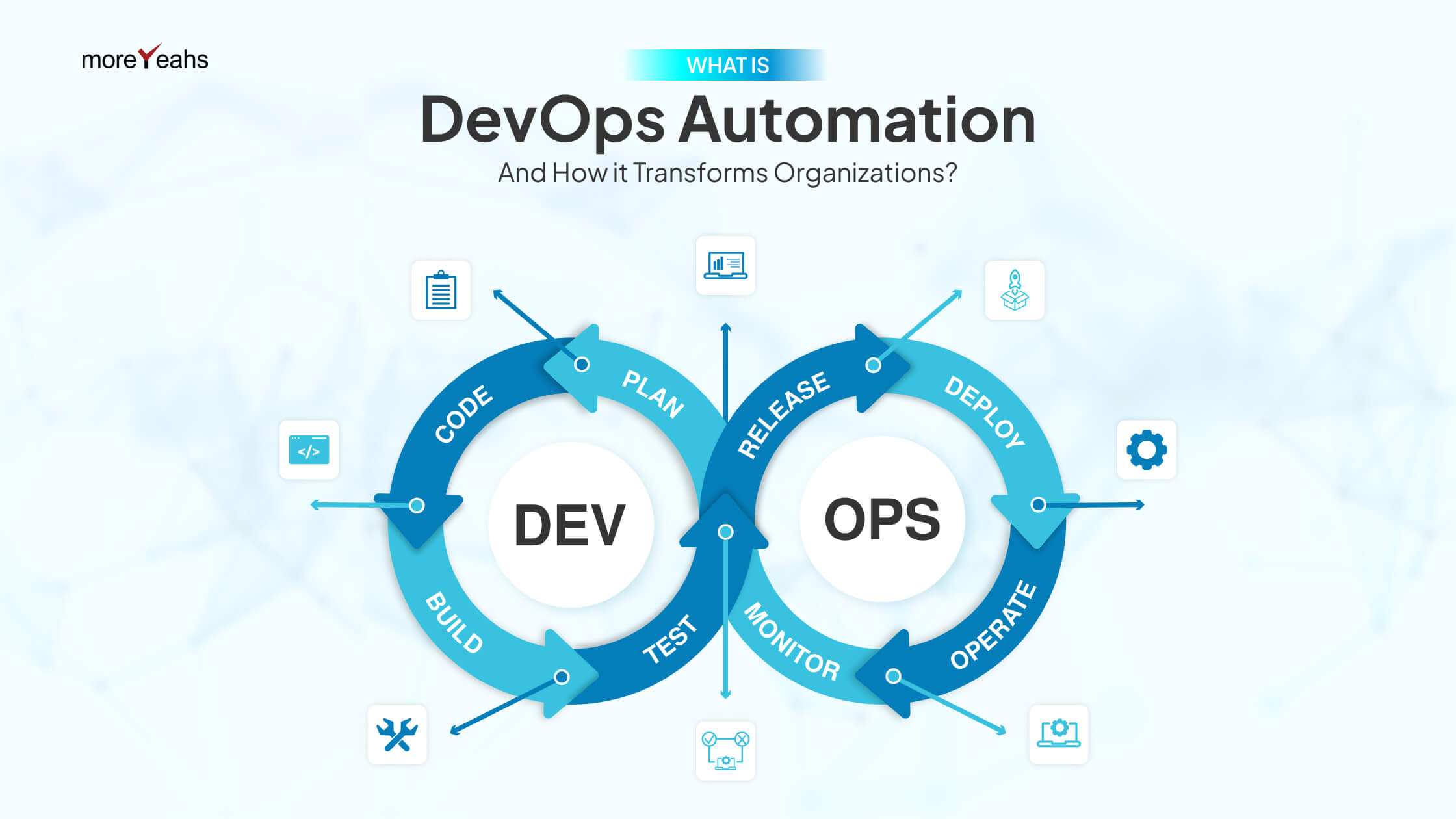
    DevOps automation refers to a set of tools and technologies that help engineers to automate routine and monotonous tasks. Without automation processes, software developers need to conduct such tasks manually. This takes up a lot of their time and slows down the delivery pipeline.

    Hence, DevOps automation helps save time by automating such repetitive tasks in the software development cycle. These aim to simplify the development process while improving reliability, efficiency, and consistency in the deployment pipeline.

    Automation in DevOps orchestration involves diverse processes and strategies. These help enable faster feedback loops to reduce human-generated error. Additionally, the DevOps automation strategies also help ensure streamlined collaboration within departments to promote a culture of continuous improvement.

    The scope of DevOps consulting services involves proven strategies and solutions to reduce integration problems. It also involves strategies to ensure early defect detection provides room for continuous feedback while tracking progress. Furthermore, the scope of what is DevOps automation also looks into enhancing an environment of collaboration and harmony between teams to streamline the deployment process.

    With DevOps automation tools like Continuous Integration and Continuous Delivery, teams efficiently merge different functions and deploy them. This allows your organization enough time to market new products or feature updates.

    Importance of DevOps Automation

    Importance of DevOps Automation
    To have a detailed idea of what DevOps automation is, it is also crucial to know its importance for deployment pipeline. The points below will provide a comprehensive idea of the importance of DevOps automation process.

    Enhanced Speed and Efficiency

    With DevOps Automation, you can focus on catalyzing the software development cycle by reducing manual labor. This will furthermore, assist in lower human interference and faster execution of tasks.

    It is also important to note that automation of DevOps processes can also help in streamlining, building, testing, and deployment. This enhances the frequency of delivery of features devoid of any bugs.

    Detection of Issues at Initial Stage

    Detection of Issues at Initial Stage
    Very often, to speed up the delivery pipeline, developers tend to overlook minor errors. These can lead to grave software failures or data breaches.

    However, DevOps automation tracks every minor error and addresses them during the development cycle. This makes the deployment process easier and cost-efficient while fixing the errors.

    Improved Collaboration and Communication Process

    DevOps automation tools also help foster a work environment of collaboration while streamlining communication by improving transparency between teams involved.

    Furthermore, with easy sharing of information, DevOps automation tools streamline the communication process with a 360-degree feedback system. This will help all team members stay on same page with the software development and track the bugs.

    Better Quality and Consistency

    Better Quality and Consistency
    The DevOps automation testing process ensures that the code changes are continuously checked and validated. The frequent scrutiny reduces instances of defects and bugs before the software enters the production stage. It also ensures consistency in deployment of software that further ensures the software reflects the superior quality while behaving predictably.

    Less Manual Errors

    As said before, DevOps automation reduces manual work to a certain degree. This, not only optimizes efficiency in deployment process, but it also lowers cases of human errors to optimize accuracy.

    Furthermore, scripts and automated workflows also tend to standardize the DevOps automation process. This helps eliminate variations that can further cause errors.

    Faster Time-to-Market

    Faster Time-to-Market
    You are already aware of what is DevOps automation and that one of its prime roles is to reduce the manual labor that goes behind. This helps save a lot of time in the development process. Consequently, by streamlining the development process, you can ensure faster deployment of products. Furthermore, getting the software ready at a shorter period, also acts as an edge as you will get ample time to market new applications or new feature updates. This will eventually help you create a buzz before the actual product launch.

    Cost Savings

    With automation, you do not need to manually control every process. Besides being time-saving, DevOps automation is also a cost-efficient process as it covers for the operation cost. Furthermore, DevOps automation also detects bugs at an early stage. This helps developers avoid costly outages and bug fixes which are common in conventional methods.

    Benefits of DevOps Automation

    Benefits of DevOps Automation
    To know more, consider browsing through the following benefits.

    Better Collaboration

    By automating DevOps orchestrations, you can enhance transparency among departments which will lead to improved communication and collaboration.

    Improved Speed and Efficiency

    Improved Speed and Efficiency
    Ensures acceleration of development process leading to faster deployments.

    Scope for Continuous Improvement

    With an all round feedback system, every team member stays on loop regarding project progress. This provides a scope for continuous improvement for every team member working on the particular software deployment cycle.

    Improved Resource Utilization

    Improved Resource Utilization
    Reduces manual labor and hence can free up teams to prioritize bigger tasks.

    Early Issue Detection

    The DevOps automation tools are capable of identifying issues and bugs at a very early stage and fixing them before deployment.

    Better Consistency and Quality

    Better Consistency and Quality
    With automation of DevOps, development and deployment teams ensure a reliable and consistent behavior of software.

    Scalability

    DevOps automation pipeline ensures handling of multiple tasks efficiently.

    Essential Tools for Automation

    Essential Tools for Automation
    For a more comprehensive idea on what is DevOps automation, you must also have an idea of the essential tools used for an automation process.

    The points below will take you through some of the essential DevOps automation tools.
    Ansible
    Jenkins
    Docker

    Kubernetes
    Git
    Jira
    Selenium
    Chef
    Prometheus
    Terraform
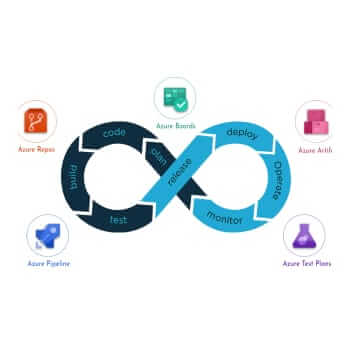
    Azure DevOps automation is another crucial platform by Microsoft that enables development and deployment with an end-to-end DevOps tool chain. Furthermore, Azure DevOps also integrates with most tools popular in the industry. All these features enroll Azure as a go-to tool for DevOps orchestration.

    Key Challenges and Considerations of DevOps Automation

    Key Challenges and Considerations of DevOps Automation-min
    Here are the key challenges that you might come across while working with DevOps automation and their solution.

    Complexity Management

    Switching to automated pipelines can be a complex and overwhelming process. To address this, your team can focus on simplifying processes using DevOps automation and testing tools. You can also contact DevOps-managed services to assist you in the transition process to manage complicated workflows efficiently.

    Skill Gaps and Training


    Every team member might not be up to date with the DevOps automation process. This might lead to gaps between team members with quick adaptability to new platforms and the ones who are comparatively slower.

    A wise way to address such scenarios is by using DevOps orchestration tools and practices that help simplify tasks.
    Additionally, organizations can also organize training sessions and programs to focus on training and up skilling the team.

    Cost Management

    Organizations must also ensure a balance in handling expenses of automation tools and cloud resources. To address this, one must optimize strategies for resource usage and choose cost-effective tools and practices.

    Future Trends in DevOps Automation

    Future Trends in DevOps Automation
    Here are the noteworthy DevOps automation trends that hold the potential to revolutionize DevOps orchestration processes in forthcoming years.

    DevSecOPs

    As cyber security of sensitive data is a growing concern for businesses and organizations across all domains, DevSecOps is slowly yet steadily gaining recognition. According to latest reports on utilization of DevSecOps, 50% of firms conduct the SAST test while 40% of firms conduct the DAST test. The remaining 10% run scans on dependencies and containers.

    To understand in simple terms, DevSecOps is a revolutionary tool that integrates security in the delivery pipeline. It tracks any threat to security at an early stage during software development. Thus, this allows DevSecOps to reduce risks associated with any security vulnerabilities in the deployment pipeline.

    MLOps Implementation

    MLOps Implementation
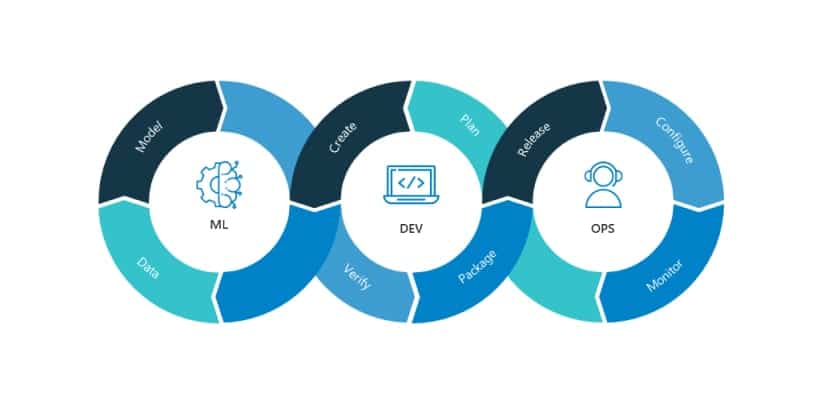
    MLOps or AIOps is a set of tools that uses machine learning and artificial intelligence to automate DevOps processes. By implementing MLOps automation in DevOps cycle, you can ensure efficiency by monitoring IT operations and management. This can also introduce real-time analysis of large datasets which can further detect anomalies. Along with these, AIOps and MLOps can also reduce manual tasks and optimize accuracy and efficiency.

    Cloud Platforms

    The demand for a bigger resource library and storage place for seamless flow in the deployment pipeline is introducing the need for a cloud-based platform in DevOps automation services. Cloud platforms also provide organizations with a large platform to develop and deploy applications and software that can be managed by team members sitting anywhere. This allows team members to focus on products and services rather than infrastructure.

    Serverless Computing

    Serverless Computing
    Serverless computing takes cloud computing to a new level with an execution model that manages allocation of machine sources dynamically. Consequently, customers do not require servers that result in cost savings, improved efficiency, scalability, and fast-growing development cycles.

    Final Thoughts

    This is everything you need to know on what is DevOps automation and its necessity in software development cycle for organizations today.

    To conclude, embracing automation in DevOps is no longer a choice but a necessity for organizations. With DevOps automation tools, your organization can strive to deliver reliable, accurate, and efficient software and products at higher frequency. For a smooth transition to DevOps automation, you can connect with the best DevOps service providers.

    To know more, about how MoreYeahs‘ team of professionals aims to revolutionize the software development cycle for your firm explore our website.

    Frequently Asked Questions

    Can I integrate DevOps tools with my existing system?
    Yes, DevOps tools are orchestrated in a manner to be integrated into your existing systems and technologies. To ensure this, DevOps tools come with API, plugins, and extensions for easy integration.
    What are some DevOps automation tools?
    Some of the popular DevOps automation tools are Jenkins, Docker, Prometheus, Nagios, Phantom, Terraform, and GitLab CI/CD.
    Which DevOps tools are in Demand?
    Some DevOps automation process tools that are highly in demand are GitOps, Low Code Applications, Microservice Architecture, DevSecOps, and Kubernetes.

  • How To Optimize Automation Using Azure DevOps

    How To Optimize Automation Using Azure DevOps

    Before doing all these we need to write test cases that contain test steps. The Test Steps describe the execution steps and expected results for each test step. The results of the comparison between the expected and actual outcomes are used to mark each step as pass or fail.

    azure devops dashboard
    login into dynamics window

    Save test case and copy its id.

    Now we need to associate this test to our unit project for it we need to place code on the repository. From the test explorer, we need to associate the test as below.

    associate the test case
    create in azure DevOps’s test case

    You need to add the ID of the test case created in azure DevOps’s test case.

    test case in ID column directly opens into azure DevOps

    You got the link of a test case in ID column which directly opens into azure DevOps.

    Here we are ready enough to use one of the most useful features of DevOps which provide true automation. The Azure Pipelines service enables you to automatically build, test, and make your code available to other users. It works with almost any type of language or project. Azure Pipelines combines continuous integration (CI) and continuous delivery (CD) to continuously test and build your code, and then deliver it. 

    Azure Pipeline is its self topic which I will cover in the next blog. Here I would like to discuss the pipeline that will automate the test cases.

    create a configuration of test plan in Azure DevOps

    Before creating a pipeline we need to create a configuration of test plan in Azure DevOps. The configuration is a platform on which the test code will run. Like which OS to use, which browser to use, etc. All these definitions provided in the configuration.

    configuration to run its test cases.

    We need to assign a configuration to test suits so suits will use configuration to run its test cases.

    add test cases into a pipeline and configure

    Now we are good to use the pipeline’s vsTest task add it into a pipeline and configure it below.

    Select test plan from the dropdown, select test suits, and select test configuration.

    check Test mix contains UI test as it is automation we need to check this.  

    Save and queue the pipeline and run it

    Save and queue the pipeline and run it. you can see real-time logs as tasks are running.

    get a summary of test cases

    We can get a summary of test cases also we can get logs of fail test cases. All these features going to provide ease in the development process and help develop more effective softwares.

  • Learn Agile Project Management with Azure DevOps

    Learn Agile Project Management with Azure DevOps

    Is Using Azure DevOps for Project Management Worth?

    If you are looking to learn agile project management, Azure DevOps seems to be the best choice. It allows choosing from a wide option of Azure Board’s planning tools that are perfect for agile project management. So, if you want to shift from traditional project management to an agile approach, DevOps with azure is the best option.
    The planning and portfolio management of the Azure Board enables the user to plan swiftly and track all work across the entire team. Major features that altogether help the project team track their workflow throughout the development cycle without any hassles are:

    • Task boards
    • Product and sprint backlogs
    • Dashboards
    • Analytics reports, etc.

    Users if paired with a project and portfolio management platform i.e. PPM Express can easily connect to Azure DevOps within a single system. This will provide clear visibility of project-related information across groups, systems, and portfolios.

    Feature of Azure DevOps Project Management

    Azure DevOps comes embedded with integrated features which are accessible either via IDE or web browser. The prominent features available with Azure DevOps include:
    Feature of Azure DevOps project management

    • User Control:

    Azure allows you to connect with your Azure Active Directory. Plus, it establishes a synchronization with on-premises AD and can even help invite guests. However, certain access rules are applicable to users, restricting them from watching certain elements. But, when users are allocated to teams, they become capable of accessing code, evaluating work, and colluding with others.

    • Azure Guests:

    This feature provides you the flexibility to invite guests from other institutions to join the team simply by entering their mail id.

    • Groups/Permissions:

    Under group management, this attribute allows adding members to the pertinent group on the organization setting page. Further, permissions on a group are also configurable for a project.

    • Teams:

    This lets users be delegated to one or more teams. This, as a consequence, restricts users to see only what is permitted by a particular team.

    • Processes and Types:

    Azure DevOps comes with pre-made customized templates. The four common work item templates offered by Azure DevOps include Basic, scrum, agile, and CMMI.

    • Backlogs:

    Backlog is nothing but a place where you can monitor, plan, and organize your projects. Generally, there are three basic backlogs in Azure DevOps which include the Portfolio backlog, Requirement backlog, and Iteration backlog.

    • Boards:

    Boards offer an intuitive interface to manage and organize your work. All your work items are placed in card format and arranged according to their latest status for easy understanding.

    • Iteration Path:

    It is used to assign work items to time intervals and is also known as sprints.

    • Areas:

    These find utility in breaking down work in a logical sequence, coordinating it with functional areas, and building websites for varied business segments.

    • Notifications:

    Send alerts to keep your team notified of every important task. Whether it’s a work assignment or activity failure/ success, you can always send alerts as and when needed.

    • Dashboards:

    Construct your own dashboard for varying purposes based on your team members’ demand, work item criteria, and other attributes as deemed appropriate.

    • Azure Repos:

    Azure Repos refers to a set of version control tools that allow developers to monitor changes in coding over time.

    • Analytics:

    Leverage Azure DevOps’s built-in analytics features, such as cumulative flow diagrams, control charts, and burn charts to get real-time updates on your workflow patterns.

    How to Use Azure DevOps for Project management?

    Users can set up one or more projects, create teams, and add users to teams. These users can be put together into groups that can permit them to perform certain things such as approve builds, update code, alter the deployment process, or generate and run tests.

    A project employs a process template to indicate the organization of work items. They can be placed into areas on one dimension and iterations on another. Areas are used for dividing the work logically, while iterations are for planning purposes. Once the work item gets completed, a developer will commit their code. This result triggers a build that indicates that the latest code will compile or will get prepared for deployment.

    Deployment can be done either manually or automatically to one or more environments. The pipeline then runs tests automatically or manually moving to the next stage. As pipelines are completely configurable, you have the freedom to either include manual steps or automated steps depending on your organization’s specific requirements.

    Why Azure DevOps?

    Requirements management using Azure DevOps can easily be performed because of its following benefits:

    • Hassle-free task distribution and individual team member workload planning interface that allows switching to other projects.
    • Task parameters and task creation can be done with just one click in the dashboard mode.
    • While reporting the duration, pending tasks are automatically recalculated and the solved ones get reset to zero.
    • Area field allows planning at the level of features, epic, and analog of category.
    • Supports extensive integration with industry and community tools.

    Thus, to achieve this, Microsoft Azure consulting services are envisioned to help companies ensure fast cloud-native development, Azure migration, and high Azure environment optimization. It helps businesses to adopt and use efficient Azure cloud services.

    Best Practices to Keep in Mind for Agile Management

    • Team Configuration:

    Based on the deliverables create agile teams. Dedicate a team for each developers group and then, assign scrum masters to handle the consolidation of agile projects.

    • Configure teams along the value streams that your company wants to deliver.
    • Configure development teams to support project management teams.
    • Sprints Configuration:

    This includes configuring a sprint cadence team to be used in a specific product group, specifying iterations for future planning, and figuring out the teams will utilize iterations to manage backlog items.

    • Work in Sprints:

    This enables developer teams to focus on a definitive series of tasks. The work designated for a sprint is visible in the sprint backlog of your team. However, sprint backlogs exist only for product backlogs and not for portfolio backlogs.

    • Sprint Burn-down Chart:

    It makes the process of tracking progress completely hassle-free.You can review the deliverables, check with other teams for dependencies, and monitor sprint progress using the sprint burn-down chart.

    Conclusion

    DevOps conclusion
    Hence, with so many features and benefits to offer Azure DevOps is certainly a great tool to be utilized in the Software Development Process. Using it will not only expedite your project delivery but will also ensure to keep up its quality. Hence, this tool provides the best solution to manage the work tasks within a team in an efficient manner.

  • Azure DevOps Self Hosted Build Agents

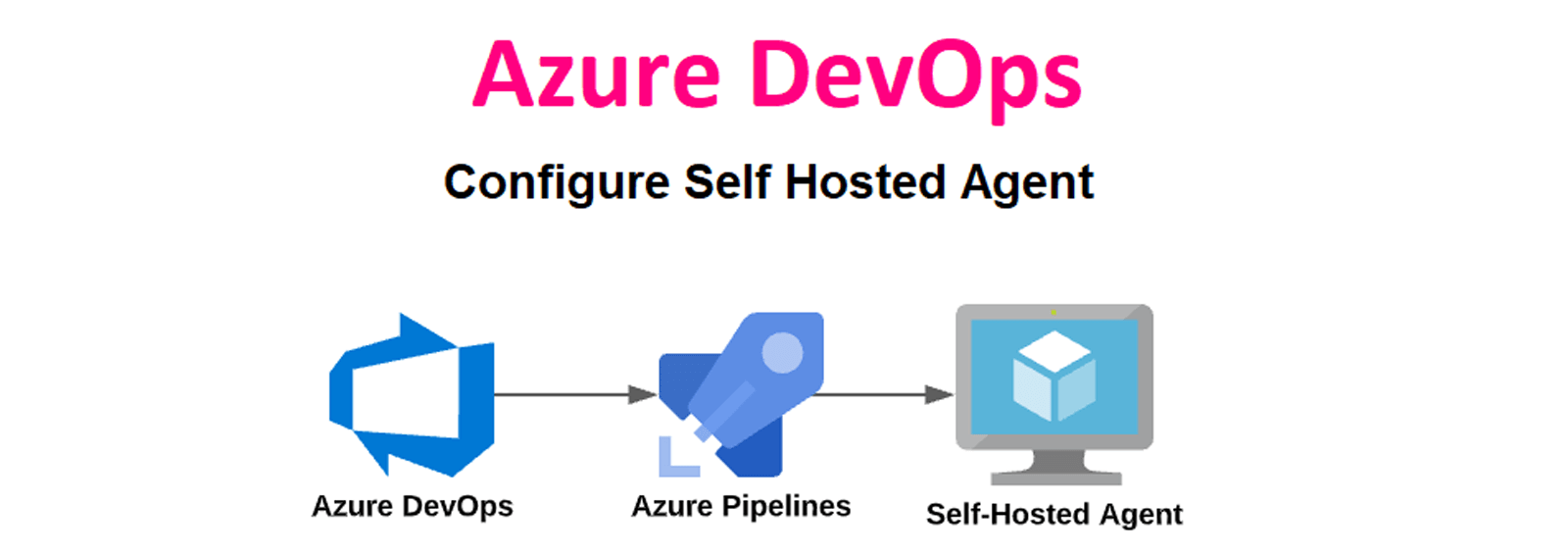
    Azure DevOps Self Hosted Build Agents

    • 1. Have a self-hosted agent just like the Microsoft-hosted agents
    • 2. Automate the process as much as possible, and limit maintenance
    • 3. Keep the self-hosted agent up to date when Microsoft updated their hosted agents
    • 4. Automatically scale agents when usage increases or decreases to optimize on the “pay for what you use” idea
    • 5. Be cheaper on a monthly basis than buying 5 Microsoft-hosted agents

    Steps To configure Self-Hosted Agents

    In this Section, We will see how to configure a self-hosted agent for Windows And Linux VM

    Creating a Personal Access Token (PAT)

    Before We start configuring agents we need to create a PAT token.

    Step 1. Go to and log in to the Azure DevOps organization’s user settings, and then select “Personal access tokens.”

    log in to the Azure DevOps organization’s user settings, and then select “Personal access tokens

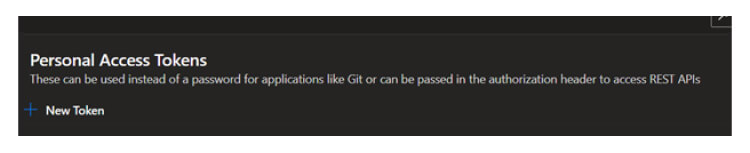
    Step 2. In the Personal Access Token Page, click on the new token to Create the new token

    In the Personal Access Token Page, click on the new token to Create the new token

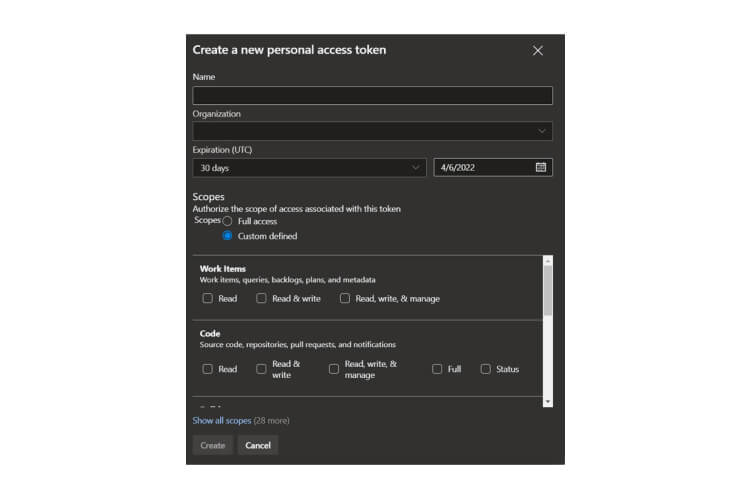
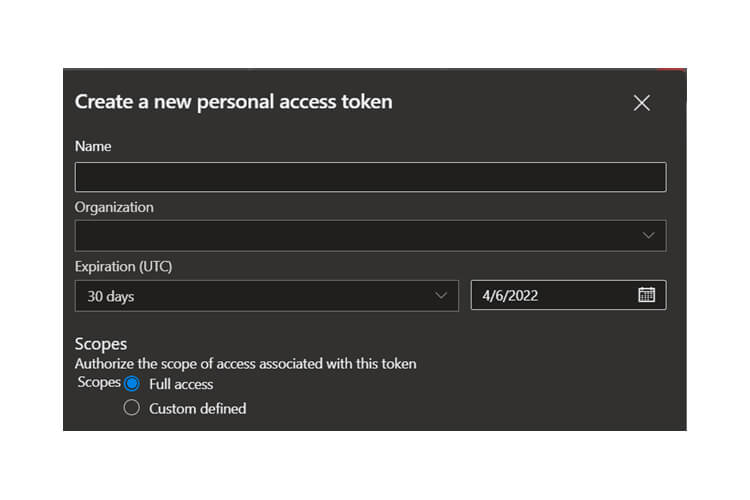
    Step 3. Provide the details Name of the token Expiration Date and permissions to this token

    Provide the details Name of the token Expiration Date and permissions to this token

    Note: Make sure to give full access for pipelines

    Make sure to give full access for pipelines

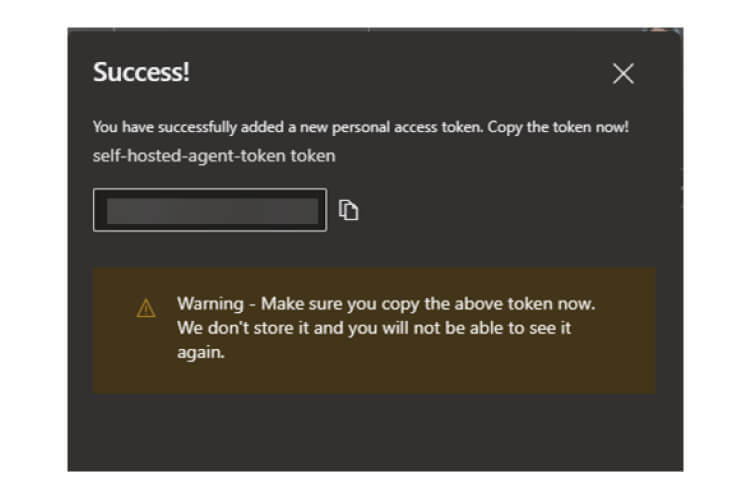
    Step 4. Once the token is generated, save it and use it in configuring agents.

    Once the token is generated, save it and use it in configuring agents.

    Installing & configuring the agents

    We have created the token so now we can start configuring the self hosted agents

    Below are the steps to create a self hosted agents

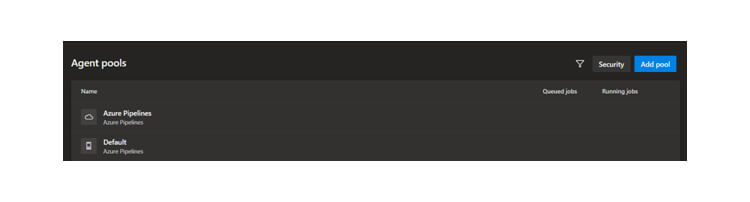
    Step 1. Navigate to the organization setting and then click on Agents pools.

    Navigate to the organization setting and then click on Agents pools

    Step 2. Select the Default Pool or You can create your own pool By clicking Add Pool

    Select the Default Pool or You can create your own pool By clicking Add Pool

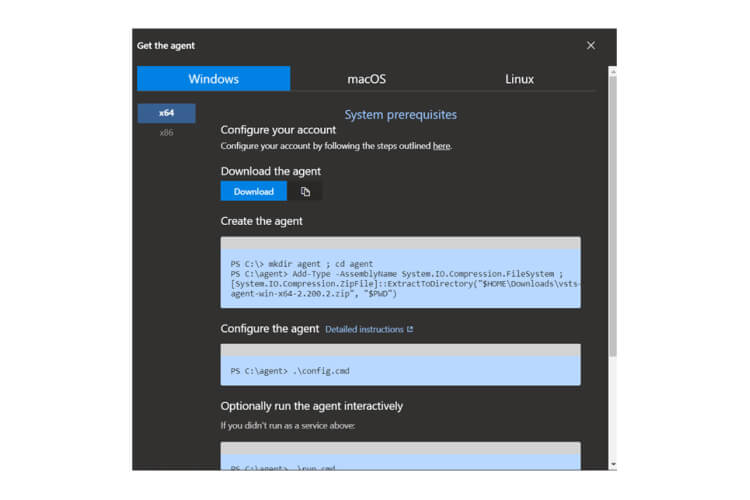
    Step 3. Now Click on new agent and follow the steps mentioned in that

    Now Click on new agent and follow the steps mentioned in that

    Step 4. You can select the desired operating system also

    You can select the desired operating system also

    Windows Installation

    Step 1. First Download the agent it will create a zip file

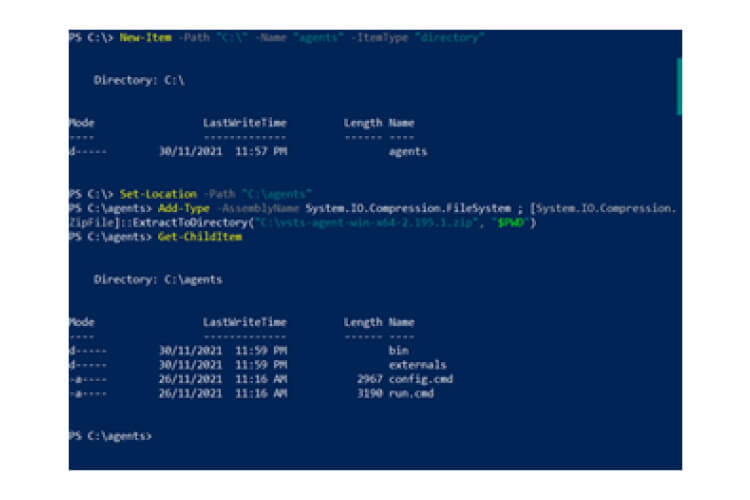
    Step 2. Now extract the zip file to the target location( it is recommended to save in C: drive)

    # Create directory and navigate to the directory

    New-Item -Path “C:” -Name “agents” -ItemType “directory”

    Set-Location -Path “C:agents”

    # Extract the downloaded zip file

    Add-Type -AssemblyName System.IO.Compression.FileSystem ; [System.IO.Compression.ZipFile]::ExtractToDirectory(“C:vsts-agent-win-x64-2.195.1.zip”, “$PWD”)

    # Verify the extraction

    Get-ChildItem

    extract the zip file to the target location

    Step 3. Start configuring the agent by below command

    .config.cmd

    Start configuring the agent by below command

    It will ask you some question which are mentioned below

    • Enter the URL: https://dev.azure.com/{your-organization}
    • Enter the authentication type (press enter for PAT) – Press enter for this step.
    • Enter personal access token. – Paste the PAT generated earlier
    • Enter Agent Pool – Press Enter if you are creating an agent in the default Agent pool, otherwise, provide the name of the Agent Pool
    • Enter Agent Name – Provide the Agent Name
    • Enter run agent as Service – Press Y for this in order to install & Run the Agent as a service in the Virtual Machine.

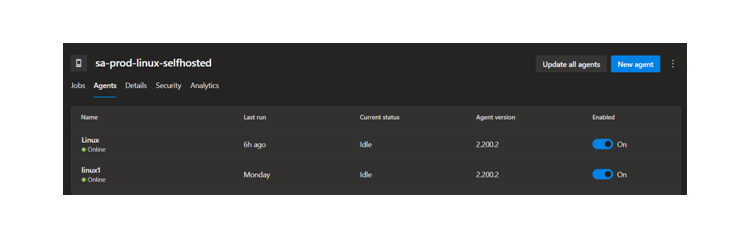
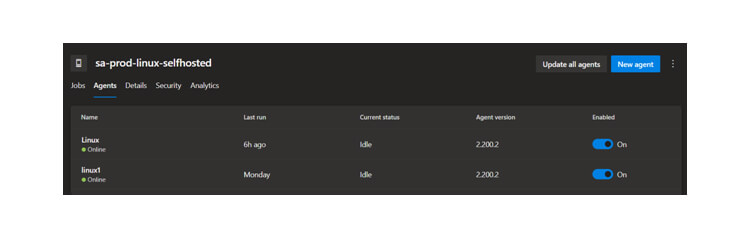
    Step 4. Now Go back to the agent pool and now you can see the agent under the pool

    Now Go back to the agent pool and now you can see the agent under the pool

    Linux Installation

    Installing and configuring the pipeline agent in Linux is similar to Windows. So, here we can see how to install Linux Agent

    Step 1. Download the agent

    Download the agent

    wget https://vstsagentpackage.azureedge.net/agent/2.195.1/vsts-agent-linux-x64-2.195.1.tar.gz

    Step 2. Create a folder and extract the downloaded tar.gz file.

    # Create directory and navigate to the directory

    mkdir agent

    cd agent

    # Extract the downloaded zip file

    tar zxf ~/Downloads/vsts-agent-linux-x64-2.195.1.tar.gz

    # Verify the extraction

    ls

    Step 3. Start configuring the giving below command

    ./config.sh

    Start configuring the giving below command

    Similar to Windows configuration, the users will be asked to enter the server details, authentication type, and the authentication token we created earlier. Then configure the agent details, and finally, the user can start the agent by running the run.sh script.

    Step 4 (Optional). You can configure the agent to run as a system service using the svc.sh script located in the agent directory. Specify the user and use the install command to configure the service.

    sudo ./svc.sh install [user name]

    sudo ./svc.sh start

    Step 5. Now go back to the agent Pool and under this pool you will get the agent running

    Now go back to the agent Pool and under this pool you will get the agent running

    I hope you’ve understood configuring a self-hosted agent for Windows and Linux VM. If you like this post, remember to share this post with others to support us in reaching more needy people.

    If you still face any issues executing these steps, consider contacting our microsoft azure managed services professionals. We have over eight years of experience and can efficiently fix complex problems.